

Data roaming is the setting that lets your phone use mobile data on another company's network when your own carrier has no coverage, usually abroad. With it on, your phone joins a partner network and your carrier may bill you for that data; with it off, you only get online over Wi-Fi. Whether it should be on depends on where you are and what your plan includes.
What data roaming is
Your SIM belongs to one carrier, and that carrier's network only reaches so far. Outside it, your phone can borrow a partner network that has a deal with your carrier. That is roaming. Apple puts it this way: Data Roaming lets your device get online over a cellular network in a region your carrier's network does not cover.
The Data Roaming switch on your phone decides whether mobile data may flow over those partner networks. If your phone has two SIMs or eSIMs, each line has its own switch.
Roaming happens in two places:
- Abroad, which is what most people mean, and where the charges are.
- At home, when your carrier hands you to a partner network in an area it does not cover. US carriers call this domestic roaming (more on it below).
When data roaming costs money
Roaming costs money when your plan does not include the country you are in. Your phone has no way of knowing that; it simply connects. Your carrier then bills you in one of three ways:
- Included in the plan. Some plans include data in many countries, often with a monthly high-speed limit, and Mexico and Canada are included on most US unlimited plans.
- A daily pass. Verizon's TravelPass and AT&T's International Day Pass start by themselves the first time you use your phone abroad on a given day, and are charged per line, per day. T-Mobile sells passes you buy ahead.
- Pay as you go. Countries outside the pass list are billed by use, and that is where the large bills come from.
The numbers change often and differ by plan, so we keep them in one place per carrier, checked against the carriers' own pages: Verizon, AT&T, T-Mobile and Mint Mobile. Our guide to travel eSIM vs international roaming compares the two ways of paying.
Should data roaming be on or off?
At home in the US
Leave it on, unless you have a reason not to. US carriers use partner networks to fill gaps in their own coverage, and on current plans it costs nothing extra, within limits:
- Verizon says you are roaming domestically when you connect to a non-Verizon network in the US, Puerto Rico or the US Virgin Islands, shown as Extended at the top of your screen. You are not charged differently unless you have one of its older plans, and you may need to turn on Data Roaming if you cannot use data.
- T-Mobile says your phone switches to a partner network outside its coverage when data roaming is enabled. It charges no additional fee but limits how much data you can use on those networks, and texts you as you approach the limit.
- AT&T calls these areas off-net. Its off-net data limit is the lesser of 100 MB or 20% of your total use in a bill period, and data off its network can be restricted for the rest of the period if you keep going over.
So at home, data roaming off mostly means no data in the places your carrier does not reach. Apple's own help page notes that, depending on your carrier, data roaming might be used when you travel domestically.
Abroad
It depends on your plan:
- Your plan includes the country, or you have bought your carrier's pass: turn it on. Apple notes that with an international data plan you may need to keep Data Roaming on.
- Your plan does not include it, or you do not want a daily fee: turn it off on your home line. Apple suggests this to avoid roaming charges while you travel. You can still use Wi-Fi.
- You are using a travel eSIM for data: turn it on for the eSIM line and off for your home line (see below).
How to turn data roaming on or off on iPhone
From Apple Support:
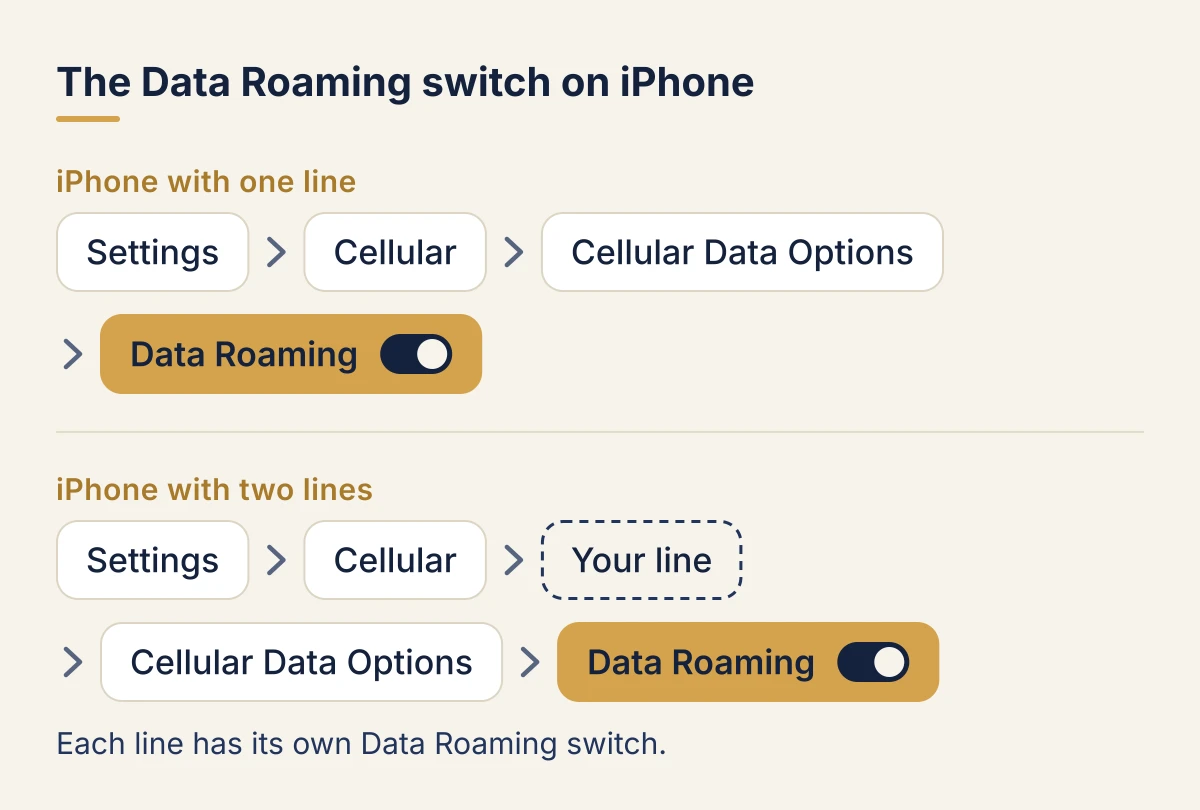
- Open Settings and tap Cellular (in some countries Mobile Data or Mobile Service).
- If your iPhone has one line, tap Cellular Data Options. If it has two, first tap the line you want to change under SIMs, then Cellular Data Options.
- Turn Data Roaming on or off.
Each line has its own Data Roaming switch, so on a dual SIM iPhone you can have it on for one line and off for the other. Depending on your carrier and phone, you may see other options in the same menu; Apple says to turn on the ones your carrier suggests.
How to turn data roaming on or off on Android
Android menus differ by maker, Android version and carrier, so your screens may not match these exactly.
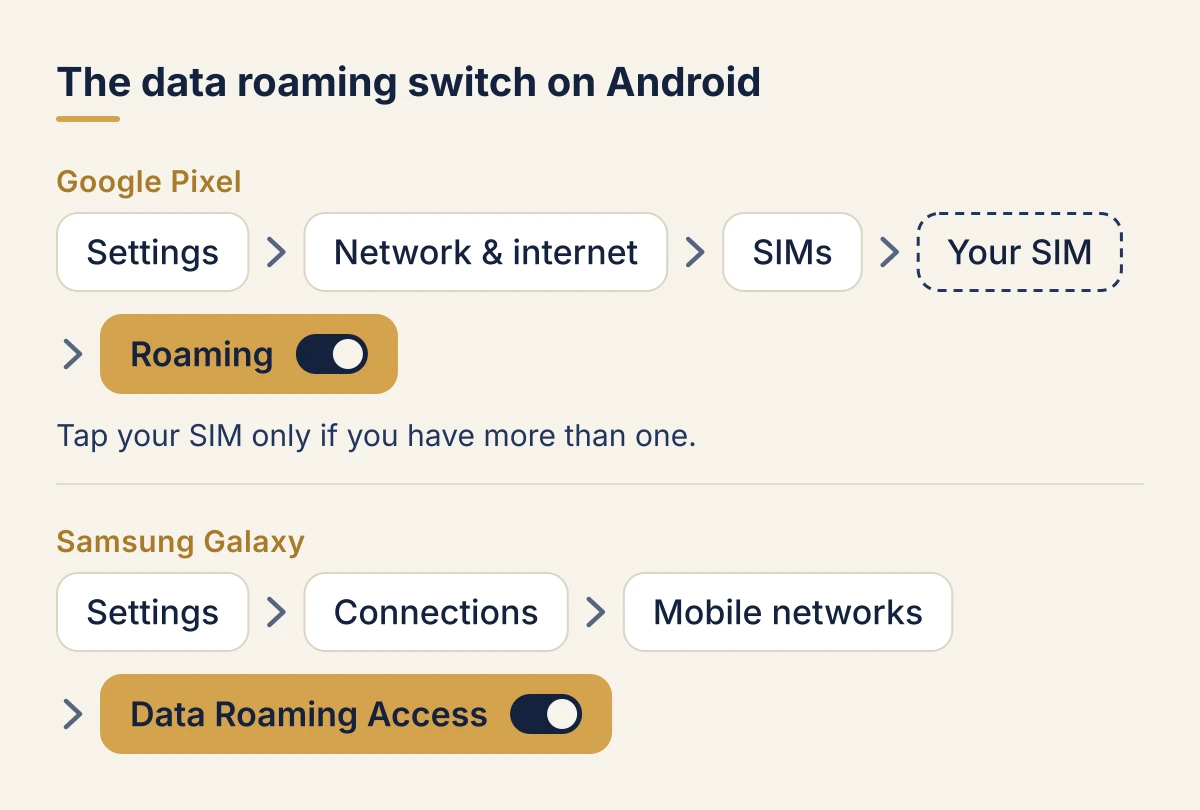
Google Pixel, from Google's Pixel Phone Help:
- Open Settings, then Network & internet, then SIMs.
- If you have more than one SIM, tap the one you want to change.
- Turn Roaming on or off. Google describes it as letting your phone send data over other carriers' networks when you leave an area covered by your carrier.
Samsung Galaxy, from Samsung US support:
- Open Settings, then Connections, then Mobile networks.
- Turn Data Roaming Access on or off.
Samsung says the screens can vary by carrier, software version and model, and that the Mobile networks menu is unavailable without an active SIM. If the switch is greyed out, Samsung's support page says to check that mobile data is turned on.
Data roaming with a travel eSIM
A travel eSIM is a second, data-only line that you add to your phone for a trip. It looks like roaming to your phone, because it connects to local partner networks rather than to a network of its own. So the rule is:
- Travel eSIM line: data roaming ON. Without it, the eSIM will not connect.
- Home line: data roaming OFF, if your plan would charge you abroad. Your number stays active for calls and texts.
To keep your number for bank codes and WhatsApp while abroad, see will I get texts with a travel eSIM?
Set the travel eSIM as the line for mobile data too, and on iPhone turn off Allow Cellular Data Switching, so a weak signal never moves your data back to your home line. Our step-by-step guides cover the whole setup: iPhone and Android. New to eSIMs? Start with what is an eSIM.
What happens if you forget to turn it off
With data roaming on and a plan that does not include the country, your phone uses data abroad as it would at home: email syncs, photos back up, apps update. On Verizon and AT&T that is enough to start a daily pass, and in a country outside the pass list you pay by use. That is how roaming bills climb.
Background data is enough. Verizon's TravelPass FAQ says a session can be started by app content refreshing, email syncing and software updates, not only by what you do yourself.
Carriers do warn you. Verizon, for example, sends alerts as pay as you go charges build up and blocks international data at $500 of unbilled use (our Verizon guide), and T-Mobile texts you as you approach your plan's allowance abroad (our T-Mobile guide). An alert tells you after the fact, though: switching data roaming off before you land is what stops the charge.
If you want no mobile connection at all, use Airplane Mode. Apple notes that you can still use Wi-Fi with it on. On board, see what works in flight.
Where to next
- Set up a travel eSIM before you fly: iPhone or Android.
- Check your phone takes one: does my phone support eSIM?
- Visiting several countries? One global eSIM covers more than 160 of them, or pick your destination from our plans.
FAQ
Should data roaming be on or off?
At home in the US, leave it on: your carrier uses partner networks to fill coverage gaps and does not charge extra for it on current plans. Abroad, turn it on if your plan includes the country or you have a pass, and off on your home line if it does not. With a travel eSIM, turn it on for the eSIM line only.
Does data roaming cost money?
Only when your plan does not include the place you are in. At home, Verizon and T-Mobile charge nothing extra for it on current plans, and AT&T limits it rather than charging for it. Abroad, it is included on some plans, charged as a daily pass on others, and billed by use in countries outside the pass list.
Should I turn on data roaming with an eSIM?
Yes, for the travel eSIM line. A travel eSIM connects through local partner networks, so it needs data roaming on to work. Keep data roaming off on your home line if your plan would charge you abroad.
What is the difference between roaming and data roaming?
Roaming is using any network other than your own carrier's, for calls, texts or data. Data roaming is the switch on your phone that controls mobile data on those networks. Turning it off stops data, not calls and texts.
Does data roaming affect calls and texts?
No. The switch controls mobile data only. Calls and texts on your home line can still be charged abroad: on Verizon and AT&T, making or answering a call, or sending a text, starts a daily pass even with data roaming off. Our Verizon, AT&T and T-Mobile guides say what each one charges. To avoid them, turn the home line off and call over WhatsApp, iMessage or FaceTime on your eSIM's data.
How do I turn off data roaming on my iPhone?
Go to Settings > Cellular > Cellular Data Options and turn off Data Roaming. With two lines, tap the line under SIMs first, then Cellular Data Options.
Facts checked on 11 October 2026 against Apple Support, Google's Pixel Phone Help, Samsung support, and Verizon's, T-Mobile's and AT&T's own pages.